Running Ghostty on a Playdate to control tmux
My Playdate connects to a remote tmux session. Crank to scroll or push B to talk (and exit vim). Under the hood, it uses ghostty-vt to emulate a terminal and connects to the remote session over mTLS.
Demo:
Over the past few weeks, I’ve been working on turning the game console into a remote control for my terminal. It’s a Cortex M7 with a 1-bit display, Wi-Fi and a mic. There is a C SDK and people have ported Doom onto it.
Here’s my architecture:
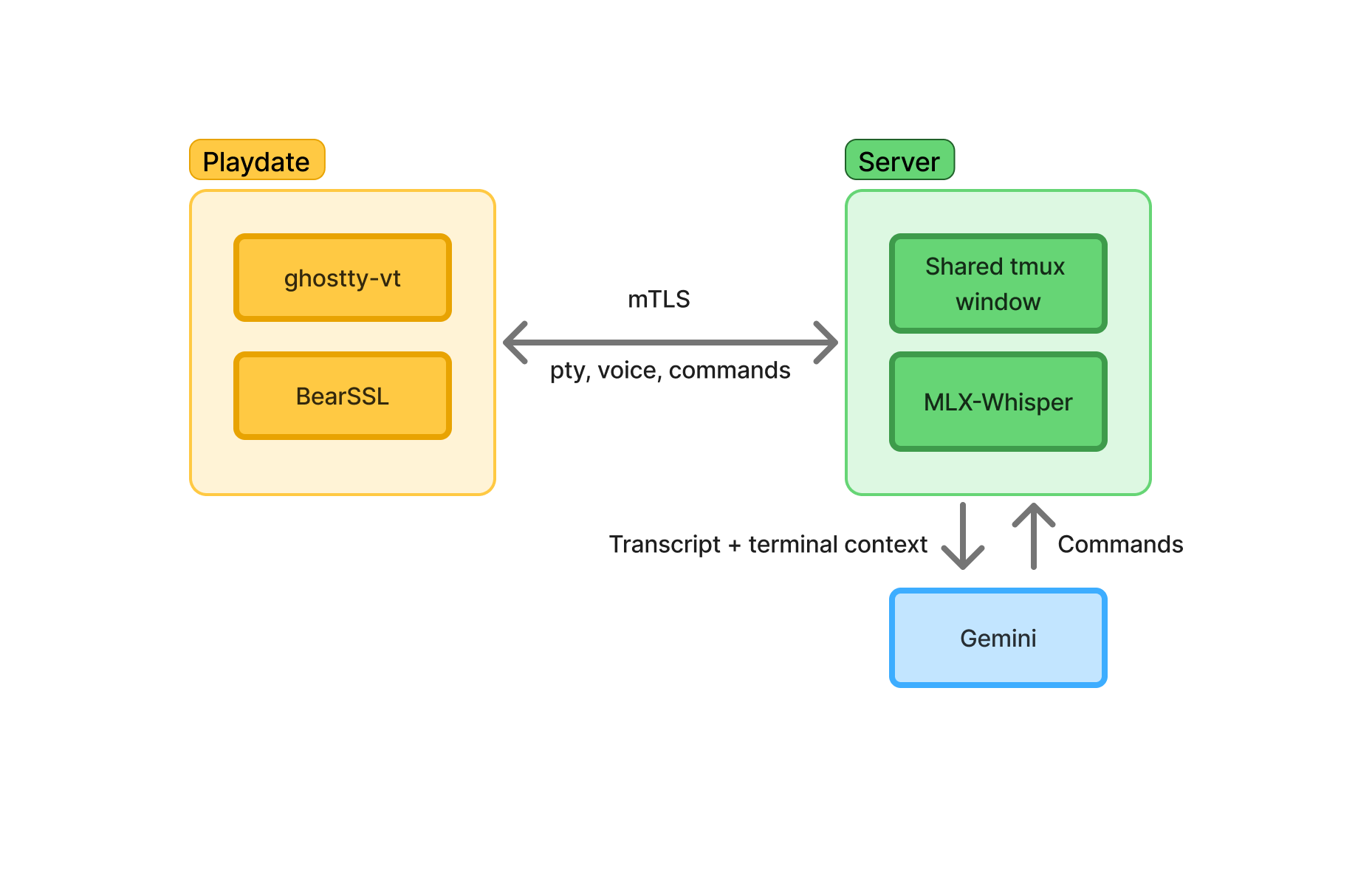
Voice as the terminal keyboard
While the D-pad and crank map to obvious inputs like arrow keys and scrolling, I still needed a way to enter text and use other keyboard commands. The UX I settled on was a push-to-talk flow. Sound is sent to the server, and converted to a command. The returned command is displayed in a preview, then the user can press A to confirm or B to cancel.
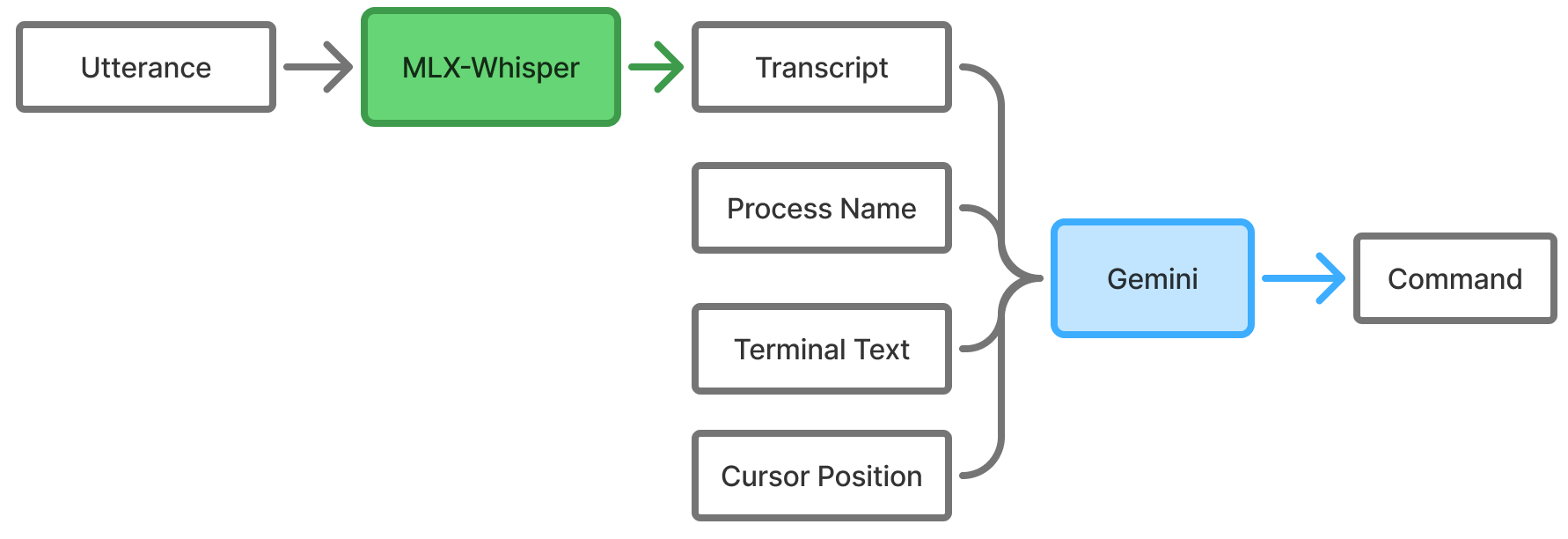
When the user activates the push-to-talk, the utterance and text in the current viewport are multiplexed over the same TLS connection as the terminal pty to the server. MLX-Whisper transcribes the utterance, and then the transcript, terminal text, running process name and cursor position are fed as context to Gemini 3.1 Flash Lite. The model is prompted to either emit raw strings, or text commands like <esc> which will be interpreted as keystrokes.
Two separate connections would be simpler but would overload the hardware. The sound chunks are uploaded in real time and transcribed once the user releases the talk button. This turns out to be a second or so faster than streaming the utterance to Gemini 3.1 Flash Live. There was also an observed network limit of 30 KB/s, so downsampling mic input from ~44 kHz to 22 kHz helped to send the sound bytes out faster. With these optimizations, the latency is brought down from close to 10 seconds to ~2-3 seconds.
It’s not 100% and may require a few attempts, but this provides sufficient accuracy to operate the terminal and even use TUIs like vim. Some primitive evals were also set up for generated command accuracy. Latency is still much higher than I would like it to be though. There’s likely a lot of room for improvement here.
Aside: Something to consider here is that the terminal contents can potentially prompt inject the Gemini call. I assume that the user looks at the screen before invoking the push-to-talk and also checks the returned command in the preview before confirming. Gemini also sees the full terminal viewport so the user needs to be careful if there is confidential information. It could be worth exploring the use of a local model here.
Ghostty on the Playdate
ghostty-vt is the terminal parsing library split out of Ghostty. This is used to maintain the terminal state. Bytes from the pty of a remote tmux session are piped into ghostty-vt, and then the rendering loop just maps terminal cells onto the screen. Since this library is written in Zig, I just went with it and wrote the rest of the app in Zig, taking reference from a Zig Playdate Template.
This library is designed to be portable, but some portions bypass the Zig allocator for faster page-aligned and zeroed memory, using mmap on POSIX which isn’t present on freestanding. Working around this involved a small patch adding a freestanding code path that uses a naive allocator set globally on startup. Kitty graphics and SIMD were also disabled using a build option.
Using ghostty-vt also introduced a significant number of relocations to the compiled binary. Empirically, I found that past ~90k relocations, it takes too long to load and the Playdate OS watchdog kills the app. Compiling in ReleaseSmall reduces the relocation count significantly and works around this issue.
What’s left is just to wire up the terminal state with font rendering. A subset of glyphs commonly used by TUIs is bundled into the font atlas. Bold text is implemented using double-strike (drawing the character repeatedly at small offsets), and lighter colored text is implemented using a small amount of dithering.
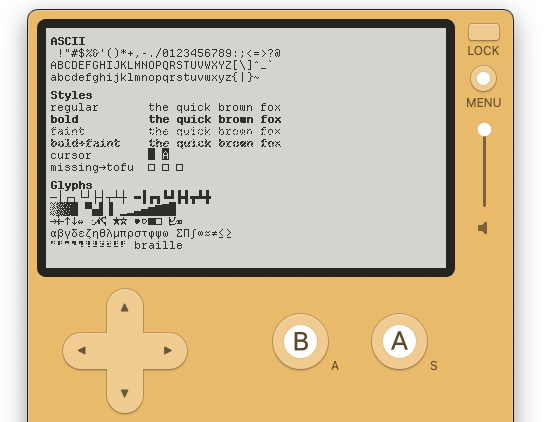
Screenshot illustrating rendering of various glyphs.
As the pty is a tmux session on a server, I can also attach to the same session separately to make changes and observe them in real time on the Playdate.
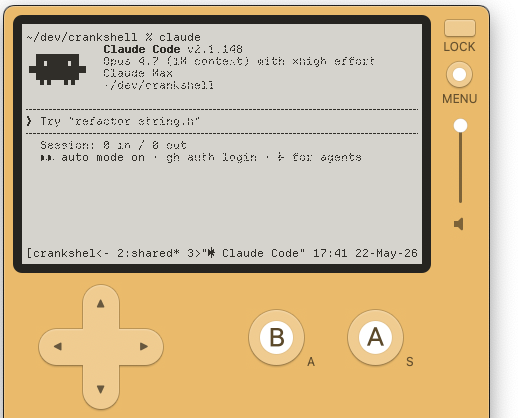
Claude Code running in the simulator.
usessl doesn’t protect against MITM
While it would be sufficient to assume that the Playdate is on some secured network, I wanted to support connecting to a Wi-Fi hotspot, or an unsecured public Wi-Fi network. This meant that I needed to use a secure channel.
The simplest option here could be to run some embedded Tailscale client on the Playdate to connect it to the shared Tailnet with the server. This doesn’t work because the available Tailscale libraries assume an OS with a real socket layer. The Playdate only exposes custom high level HTTP/TCP APIs.
The approach I really wanted to go for was to make the Playdate an SSH client but that didn’t work out. I’d need to implement a large portion of the SSH client from std.crypto primitives, or port something like libssh2 over. There were also some hiccups with using std.crypto that led to more hand-rolled workarounds that made it much less attractive. There’s also no good source of entropy to support per-session cryptographically secure randomness, weakening forward-secrecy.
To work around the need to hand-roll crypto primitives, I toyed around with offloading crypto to a remote server (similar to drand) since the Playdate appeared to support usessl in its networking APIs. The idea was to delegate crypto functionality that was difficult to implement to a fully featured remote server over a secure channel.
That was when I found through a small test with a self-signed cert that usessl encrypts the connection, but doesn’t actually validate the server’s certificate. This leaves the app vulnerable to a man-in-the-Middle (MITM) attack, and invalidates the whole offloading crypto approach.
In the end, I settled on implementing mTLS in userspace with the BearSSL C library over the raw TCP APIs. The client and server validate each other’s identities using pinned credentials. The build process was set up to derive credentials from a .env and embed the relevant certs into both the server and client.
Development loop
All the code was written with Claude Code. I optimized for a working prototype and simple, secure architecture rather than a polished codebase.
For speed and autonomous work, it is important to take as much manual work out of the loop as possible. Early on, I set up a hacky script for the agent to test its changes on both the Playdate simulator and hardware. This slowly grew into screenshot functionality with logs and stack traces (thanks to playdate-reverse-engineering). For example, it runs the app on the simulator, waits a few seconds, then prints out:
attach: tmux attach -t crankshell
Current screen shows:
  zig-out/pdsim.txt  (OCR text)
  zig-out/pdsim.png  (screenshot)
Sim log: zig-out/sim.log
OCR of the screen’s contents is provided with claude --model haiku -p. Based on the task, the agent can decide whether to read the OCR text (more token-efficient), or read the screenshot directly.
In general, it is a workflow smell when the agent looks like it’s repeatedly running a set of long bespoke commands instead of running a pre-defined shell script. In CLAUDE.md, I have a line that says:
- Watch for dev-loop friction during normal work — hand-chained commands that should be one tool, missing visibility (had to read a PNG to know X), repetitive cleanup, anything that turned a 5-minute task into 30 — and append it to
todo.mdwith enough context to act on later. Observations evaporate between sessions.
I also added a skill to read the Playdate SDK docs which helped.
Wrapping up
Some pieces that I’m not too happy with:
- Push-to-talk latency and accuracy. Possibly using local models here as well?
- Forward-secrecy isn’t robust since the Playdate doesn’t provide a secure randomness source
Even so, it has still been a fun way to spend my weekends justifying a Playdate that ended up sitting on a shelf for years.
If you have one, try it yourself (repo link).